> ## Documentation Index
> Fetch the complete documentation index at: https://docs.alpic.ai/llms.txt
> Use this file to discover all available pages before exploring further.
# Submissions
> Submit your MCP server to the ChatGPT and Claude plugin directories
ChatGPT and Claude are the two consumer plugin stores for MCP servers, and both run a review process before your plugin is listed. Each one asks for a long list of copy, assets, policy answers and test cases, in its own format.
The **Submission Helper** in your Alpic dashboard prepares all of it for you: it reads your deployed server, pre-fills what it can, drafts the narrative fields, and hands you a package ready to paste into the store's own submission form.
The helper is **not** a submission service. It does not submit for you, and it does not guarantee approval. It only
produces the assets you need to submit.
## The two stores
| Store | What it requires | Where you submit |
| ------------------- | -------------------------------------------------------------------------------------------------------------------------------------------------------------------------------------------- | --------------------------------------------------------------------------------------------- |
| **ChatGPT & Codex** | A [verified individual or organization](https://platform.openai.com/settings/organization/general) on the OpenAI platform | [platform.openai.com/plugins](https://platform.openai.com/plugins) |
| **Claude** | A Team or Enterprise organization, plus [directory management access](https://claude.com/docs/connectors/building/submission#before-you-start) (Owners only, unless delegated on Enterprise) | [Claude.ai directory submissions](https://claude.ai/admin-settings/directory/submissions/new) |
## Before you start
* The environment you submit must have **at least one successful deployment**. The helper reads your live server to pre-fill the form and to collect its tool list. With nothing deployed, you won't be able to launch the helper.
* You need the URLs the stores require: privacy policy, terms of service, company website, and a support channel.
The Submission Helper does not yet support **OAuth-protected MCP servers**. If your server requires authentication,
the pre-fill step cannot connect to it and the submission will come back empty. Support is on the roadmap.
## Preparing a submission
 Go to your project and open **Submissions**, then click **Submit my plugin**.
Choose ChatGPT or Claude, and the environment to submit. Each store has its own form and its own requirements, so a
submission always targets exactly one store.
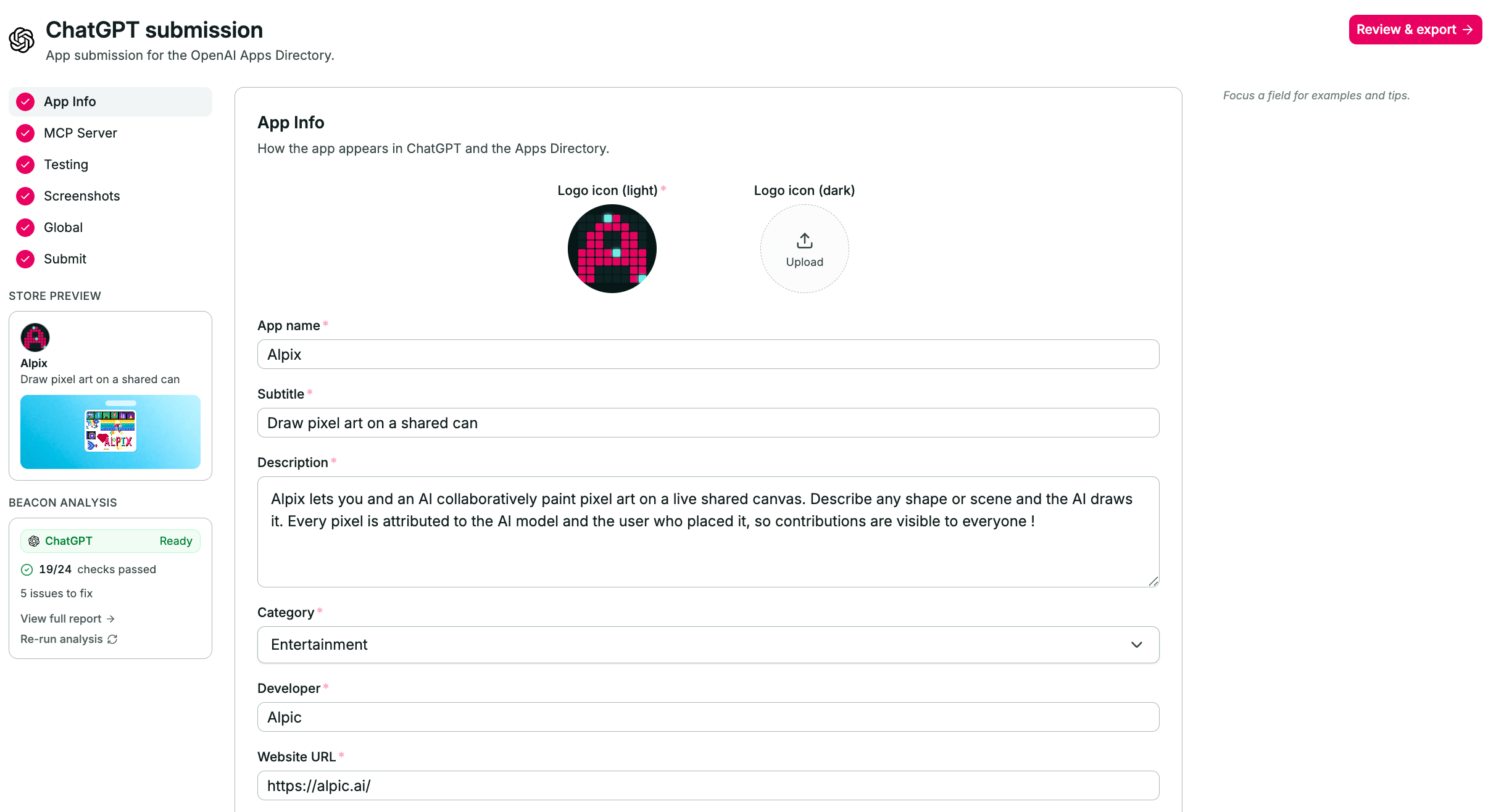
Alpic connects to the deployed server, reads its manifest and tools, and fills the form from your project data. It
also drafts the narrative fields : description, subtitle, test cases.
Treat every drafted field as a first draft: read it, correct it, and make it yours. Reviewers reject vague or
inaccurate listings, and generated copy is where inaccuracy hides.
The form is split into sections in the left-hand nav, with a completion count at the bottom. Drafts auto-save as you
type, so you can leave and come back.
**ChatGPT** : Info, MCP, Skills, Prompts, Testing, Screenshots, Global, Submit.
**Claude** : Connection, Listing, Use cases, Company, Authentication, Data handling, Test & launch, Compliance.
Logos and screenshots are uploaded from the form and hosted by Alpic, so you have real URLs to give the store.
The submission shows **Ready to export** once every required field is filled and its Beacon checks pass. From there,
open the handoff for the store you picked.
## Beacon runs automatically
Creating a submission also kicks off a [Beacon](/testing/beacon) audit of the environment you selected, and the result
appears on the submission as **Beacon analysis**. You can re-run it after fixing something.
Beacon checks your server against the same specifications and platform requirements the stores apply during review, so
its errors are the ones most likely to get your plugin rejected.
## Submitting to ChatGPT
Submissions go through [platform.openai.com/plugins](https://platform.openai.com/plugins).
The ChatGPT handoff gives you two things:
1. **A generated submission file.** Download it and drop it into the upload box at the top of the **Info** step of OpenAI's submission flow. It carries most of your listing.
2. **The remaining fields.** Anything the file can't carry is listed with a copy button, ready to paste field by field.
## Submitting to Claude
Anthropic's directory wizard reads your server live, which makes the order here matter.
With the connector in place, open the [directory submission form](https://claude.ai/admin-settings/directory/submissions/new) and copy each value from the Alpic handoff into the matching field. The handoff is laid out in the same order as the wizard.
Go to your project and open **Submissions**, then click **Submit my plugin**.
Choose ChatGPT or Claude, and the environment to submit. Each store has its own form and its own requirements, so a
submission always targets exactly one store.
Alpic connects to the deployed server, reads its manifest and tools, and fills the form from your project data. It
also drafts the narrative fields : description, subtitle, test cases.
Treat every drafted field as a first draft: read it, correct it, and make it yours. Reviewers reject vague or
inaccurate listings, and generated copy is where inaccuracy hides.
The form is split into sections in the left-hand nav, with a completion count at the bottom. Drafts auto-save as you
type, so you can leave and come back.
**ChatGPT** : Info, MCP, Skills, Prompts, Testing, Screenshots, Global, Submit.
**Claude** : Connection, Listing, Use cases, Company, Authentication, Data handling, Test & launch, Compliance.
Logos and screenshots are uploaded from the form and hosted by Alpic, so you have real URLs to give the store.
The submission shows **Ready to export** once every required field is filled and its Beacon checks pass. From there,
open the handoff for the store you picked.
## Beacon runs automatically
Creating a submission also kicks off a [Beacon](/testing/beacon) audit of the environment you selected, and the result
appears on the submission as **Beacon analysis**. You can re-run it after fixing something.
Beacon checks your server against the same specifications and platform requirements the stores apply during review, so
its errors are the ones most likely to get your plugin rejected.
## Submitting to ChatGPT
Submissions go through [platform.openai.com/plugins](https://platform.openai.com/plugins).
The ChatGPT handoff gives you two things:
1. **A generated submission file.** Download it and drop it into the upload box at the top of the **Info** step of OpenAI's submission flow. It carries most of your listing.
2. **The remaining fields.** Anything the file can't carry is listed with a copy button, ready to paste field by field.
## Submitting to Claude
Anthropic's directory wizard reads your server live, which makes the order here matter.
With the connector in place, open the [directory submission form](https://claude.ai/admin-settings/directory/submissions/new) and copy each value from the Alpic handoff into the matching field. The handoff is laid out in the same order as the wizard.