

What is collected by default
For every MCP request, Alpic records metadata only:- The method and tool name called
- The MCP client name (ChatGPT, Claude, Cursor, …)
- Timestamp, response time, and estimated output tokens
- The error type and code, if the request failed
- A user identity when one can be resolved, stored as a hash for keys and tokens (see How users are counted)
- IP addresses
- Raw API keys or tokens, only hashes are stored
- Request or response contents, unless you explicitly enable payload collection below
Data collection settings
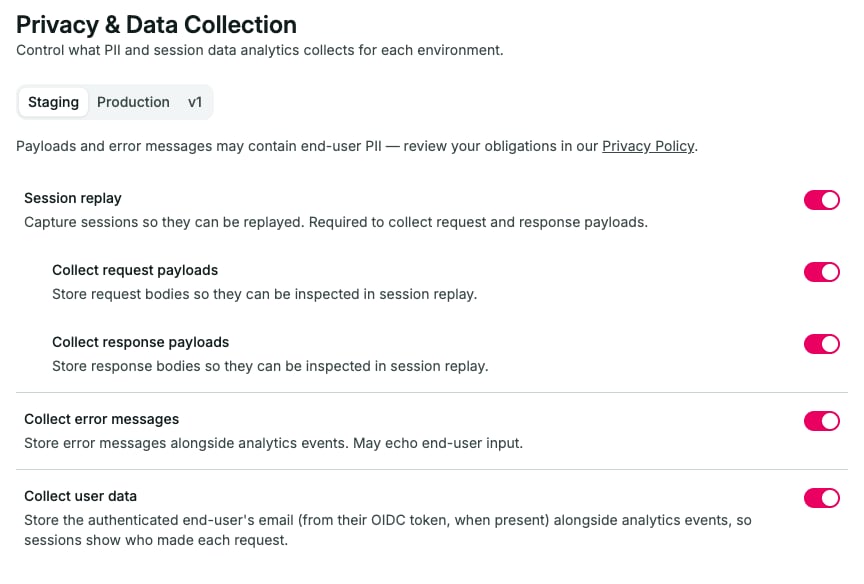
All of these settings require a paid plan. On the Free plan they appear locked, and nothing beyond metadata is ever stored, including error messages.
A few practical notes:
- The coarse location is only what ChatGPT itself sends with the call: country, city, and coordinates rounded to two decimals (about 1.1 km). It is never derived from the caller’s IP address, and calls from other MCP clients carry no location at all.
- Payloads are collected only for
tools/call,prompts/get, andresources/readrequests, and only while both the corresponding toggle and session replay are enabled. - Payloads larger than 256 KB are skipped.
- Collected data follows your plan’s analytics retention.